
FESCO Online Bill
WE Welcome you to our enlarged scale bill checking website. You can check your FESCO Bill Online here and generate duplicate bill also can subscribe on monthly basis for free to get your bills on your emails.
FESCO Online Bill
Introduction to FESCO (Faisalabad Electric Supply Company)
Faisalabad users are waiting for their FESCO bill, Now no need to worry if you haven’t received your WAPDA bill till now. As we are providing you services to check your Bill free of cost here. Check your FESCO Online Bill and download it as a duplicate Fesco bill then print it out to pay. It’s understandable how much you worried about your electricity bill when the bill did not come on time. No need to worry now, just visit our site and check your bill. Simply check your bill by putting 14 digits Reference Number or Customer ID to get your duplicate bill of FESCO.
- Call Us Today
+92 (41) 9220184-9220229
About FESCO
FESCO stands for Faisalabad Electric Supply Company (FESCO) and it was established in 1998. Basically, FESCO works under the WAPDA ( Water and Power Development Authority ), or you can say it is a chunk of WAPDA, which was founded in 1958 by the Government of Pakistan to maintain the country’s own electricity system. After that the Government of Pakistan divided WAPDA into small chunks like MEPCO, HESCO, PESCO, LESCO, IESCO, FESCO, SEPCO and many more, and right now these all companies are working under PEPCO. FESCO is also from one of these chunks and this company’s headquarter is in Faisalabad. FESCO covers the areas of Faisalabad and nearest to, supplies the electricity to about 4.96 mission customers with the population of 26 million people.
The main motive of FESCO is to supply electricity to all the areas in Faisalabad, deliver electricity from transmission lines to the grid stations. NEPRA is controlling this company by their rules and regulations. NEPRA is an authority which regulates the electricity in Pakistan. FESCO is also providing to check their bills on time to their customers to make them comfortable and resolve their issues on time.
Get Your Free Consultation
Are you stuck in any process? Need Our COnsultation for solution then feel free to contact us any time. We always provide customer services to our customers.
How to Check Your FESCO Online Bill in 2025
FESCO offers an easy-to-use online system for checking your electricity bill. You can verify your monthly FESCO bill using a 14-digit reference number.
Steps to Check FESCO Bill Online:
Visit the FESCO Official Website.
Locate the "Bill Information" or "Online Bill Check" section.
Enter your 14-digit Reference Number (found on any previous bill).
Click on “Submit” or “View Bill”.
Your FESCO e-bill will appear, including the due date, amount, and unit consumption.
Subscribe Email Services.
FESCO Duplicate Bill Download
If you have misplaced your paper bill, don’t worry. You can download a duplicate FESCO bill easily.
Go TO Fesco Bill Page
Enter your Reference Number
Click “Print” or “Download PDF” to save a duplicate copy
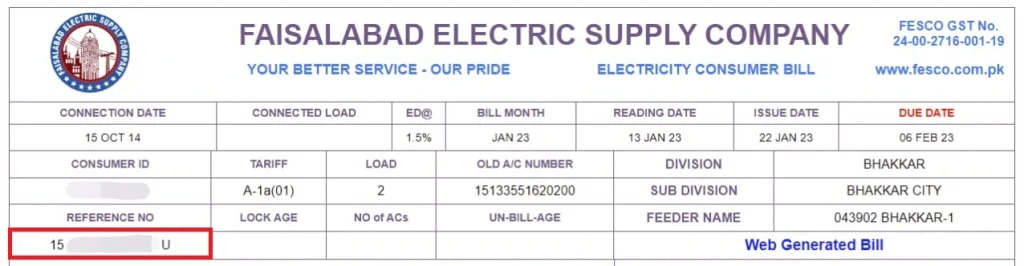
How to Find a 14 Digit Reference Number?
Now here’s the question that from where we can find the 14 Digit Reference Number then the answer is simple, without a Reference number you aren’t able to get your duplicate FESCO bill. You can find the 14 Digit Reference number of your bill from any old bill on the right side of the bill with highlighted text Reference No. Still not able to find them for your ease we had added a picture with an encircle on it where you can find the Reference Number of your bill.
FESCO Company Details
Name | FESCO |
Category | Electricity Distribution |
Industry | Electricity Distribution |
Established | 1997 |
Head Office | Faisalabad, Pakistan |
Office Location | Faisalabad |
Area Served | Central Punjab |
Owner | Government of Pakistan |
Key Person | Engineer Bashir Ahmed (CEO) |
Number of Employees | 3,000 |
FESCO Bill Check via SMS
Faisalabad Electric Supply Company provides you an option to check your bills using your register number and get your bill details on each month’s 1st date. This service is helpful for those who have no internet connection in their region or low internet speed. You may register your mobile number using the given article FESCO SMS Service.
FESCO offers an SMS service for real-time bill updates.
How to Register for FESCO SMS Alerts:
- Send your 14-digit Reference Number to SMS Code 8118.
- You will receive monthly SMS updates about your bill.
Tip: This is especially useful for those without internet access.
FESCO Bill Email Service
You are likely an email user and you like to check updates on your email always then no need to worry, FESCO is providing you Email Service so that your bill will reach you always in your registered email address.
FESCO Services
FESCO is offering the following services to their customers.
- Correction of electricity bills.
- Reading and installation of electricity meters.
- Provide you proper guidance of paying bills and other customer services.
- Provides customers support 24/7.
- Distribution of electricity without any pause to homes and business places.
- Facility to check and pay bills.
Bill Information
Fesco Online Bill is a website that helps you to get information about FESCO Company and also lets you download duplicate bill, check your current month’s bill. Check the bill and pay your bill on time before the due date so that you can relax from being over pay the bill amount after the due date. From this site when you check your duplicate bill you will get information like, Due Date, Amount of the Bill, history of your previous bills payment of 12 months and much more. FESCO launched a new feature that customers can check the status of their bill whether it is paid or not or under process of payment.
FESCO Consumers
Almost all the customers of FESCO are from the city called Faisalabad. This city is the main industrial hub of Pakistan because there are many industries established like Cloth Factories and much more. FESCO is providing electricity to all these industries without any break and facilitating them quality electricity. FESCO is covering the 30 seats of the Punjab National Assembly and 50 seats of Punjab Assembly.
How to Print FESCO Online Bill
Printing your FESCO bill is too easy now just follow the given steps.
- Once your bill has appeared successfully, click on the “Print” button on the top right corner.
- Then click on the Print button to process your printing.
- When your bill has been printed now you can use it for the purpose of payment.
How to Print Tax Certificates
Follow the given steps to print your Tax Certificate.
- First of all check your FESCO electricity bill by providing 14 digit Reference No in the given box of checking bill.
- After putting the said information in the box your bill will appear in front of you, now simply click on “Tax Certificate”, which is the next option, that is located right below the Bill option.
- Click on the “Print” button.
TOU/TOD Meter
TOU/TOD meters are basically modern type meters that actually help consumers to use electricity in a better and efficient way. Functionality of these meters are they device day into different times like usually peak and off-peak hours, and also apply different prices according to the use of peak hours efficiently.
How to Check if Your FESCO Bill is Paid or Not?
Are you worried about your bill that you had paid your bill and now want to confirm your bill is paid or not, no need to worry about it.
How to Fix the FESCO Bill Not Found Error
You are checking your FESCO Online Bill and you found an error that your bill not found then no need to worry just follow these steps:
- Reference Number: Before checking your FESCO Duplicate Bill must verify your Reference Number again and then check your bill.
- Customer ID: Sometimes the user is in a hurry and forgot a digit while checking the bill, must re verify your Customer ID while putting the number in the check box.
Aim of FESCO
The Aim of FESCO is to provide quality electricity with low-cost, and with no low time services to the people of Faisalabad and 7 other districts.
Online FESCO Bill Payment Methods
You can pay your FESCO electricity bill through multiple online platforms in Pakistan.
Bill Payment Channels:
Platform | Method |
JazzCash | App/USSD Code |
Easypaisa | App/Agent |
NADRA Kiosk | Biometric Payment |
Online Banking | Meezan, HBL, UBL, etc. |
Mobile Wallets | SadaPay, NayaPay |
ATM Machines | Select ATMs |
Secure Payment Tip: Always double-check your Reference Number and ensure SSL padlock is visible on payment websites.
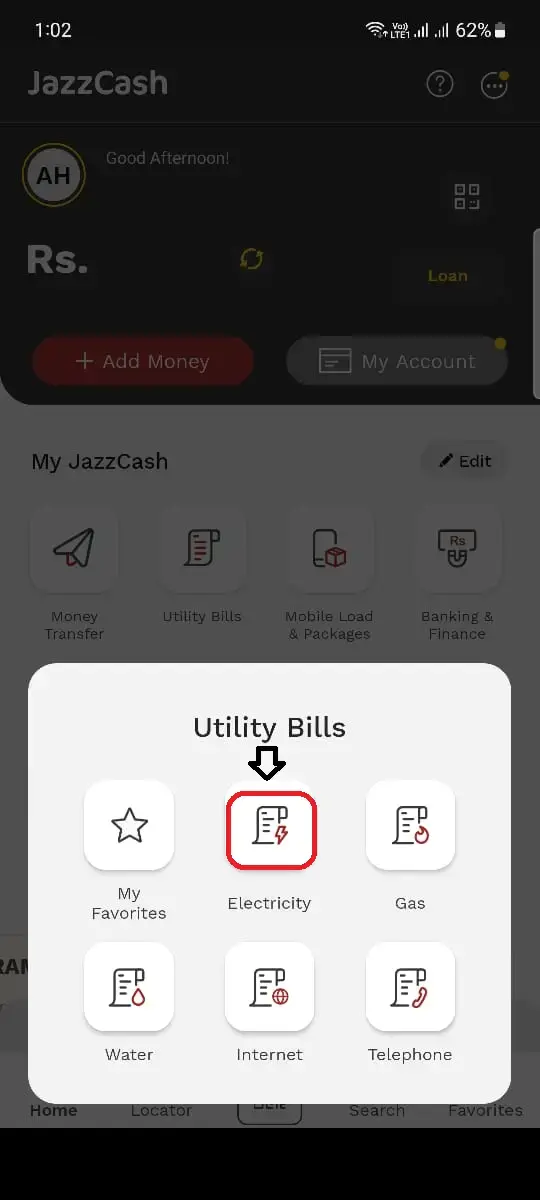
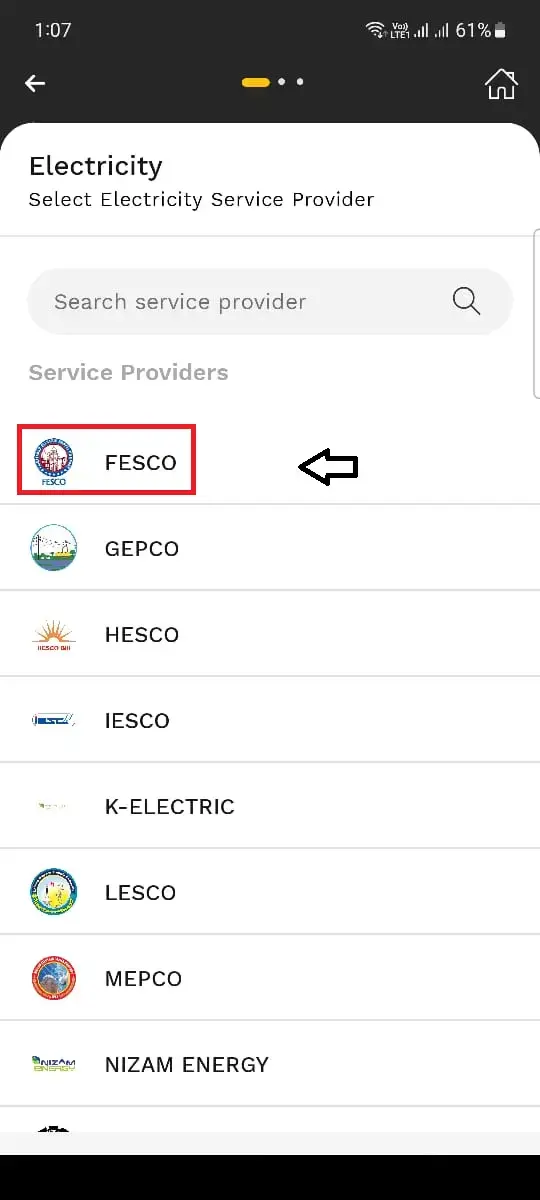
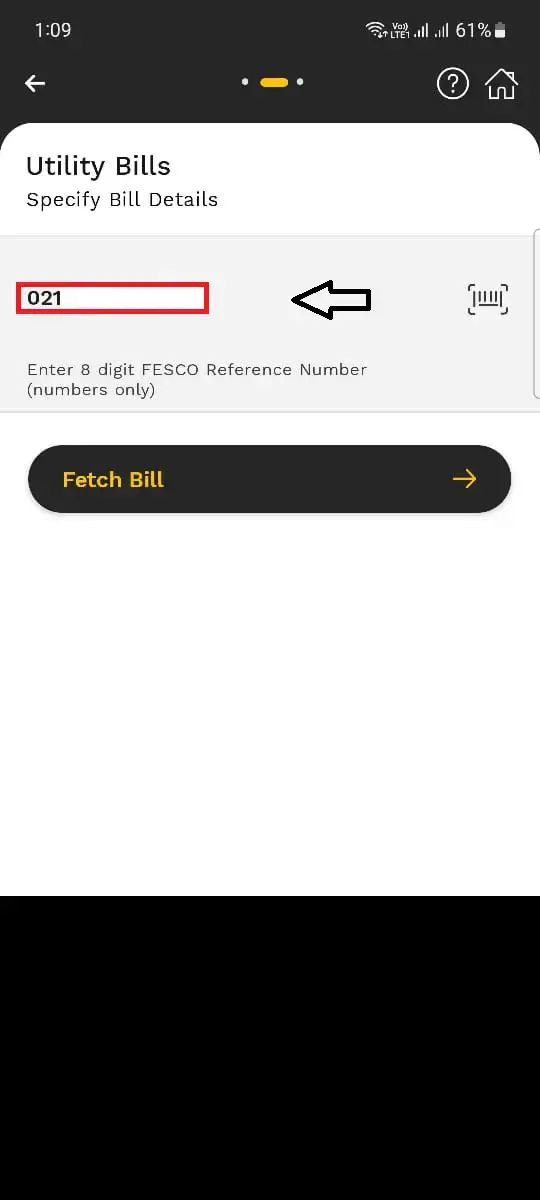
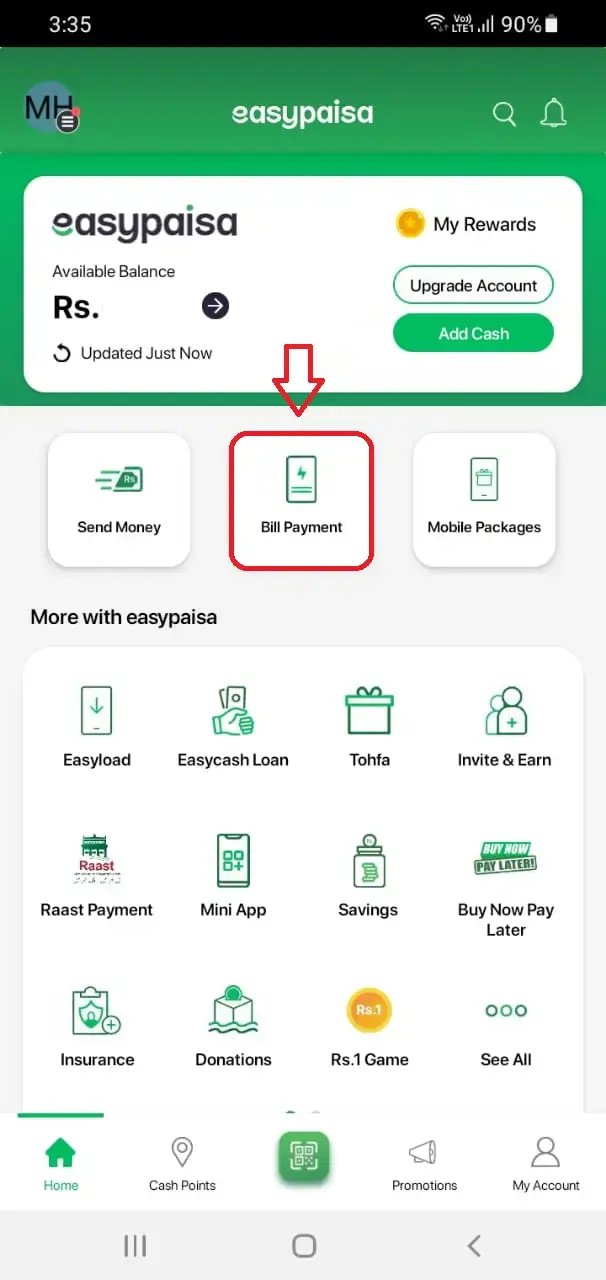
How to Pay FESCO Bill Using Apps
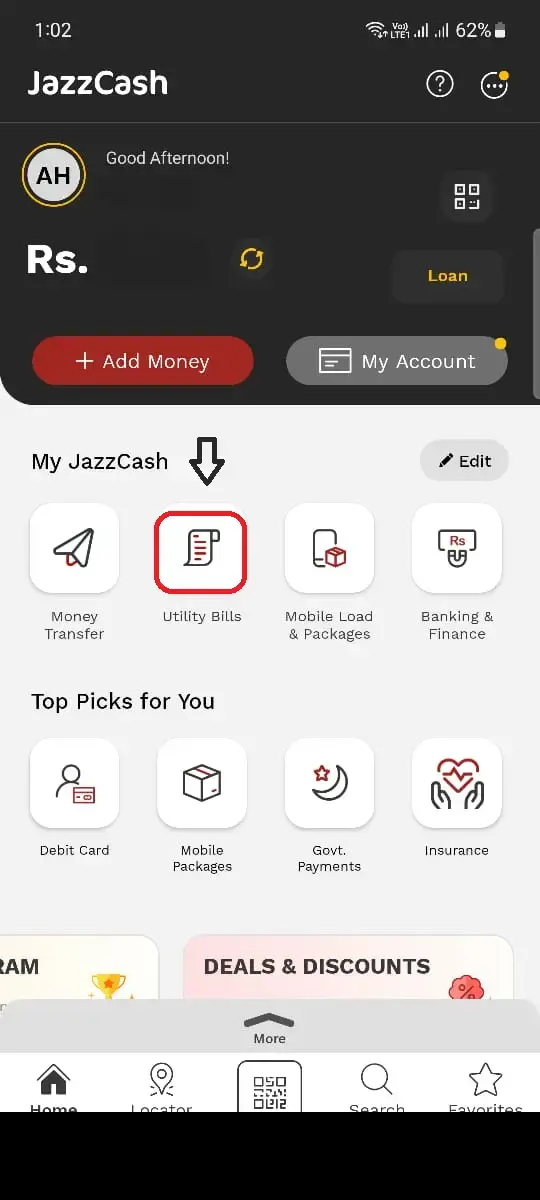
Jazz Cash:
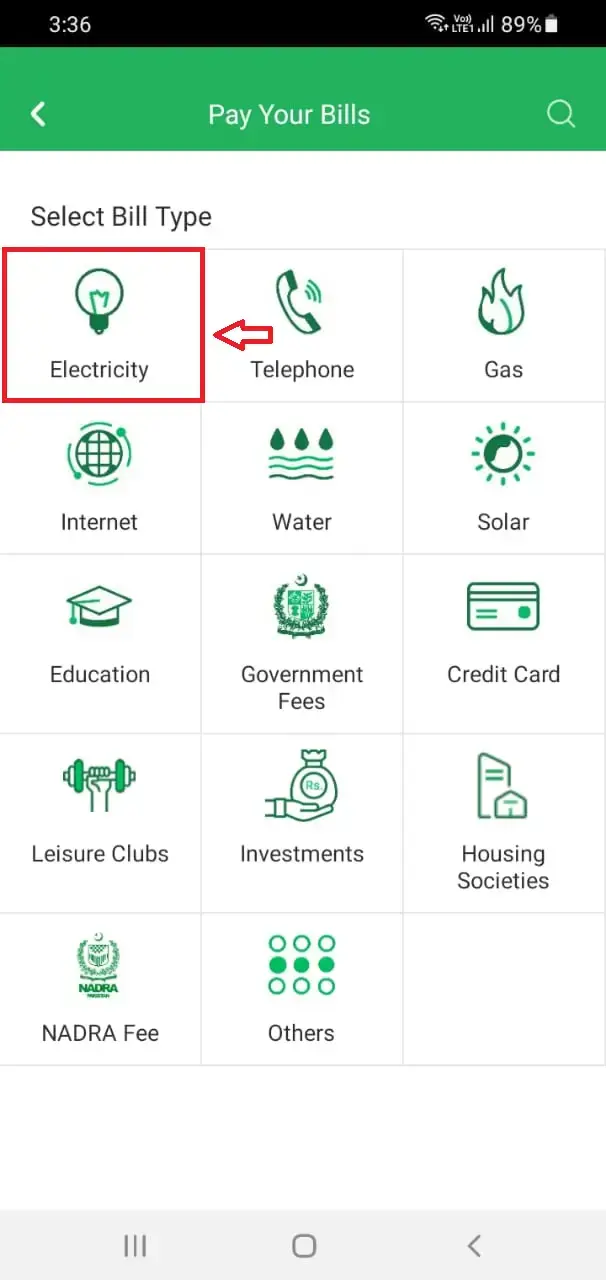
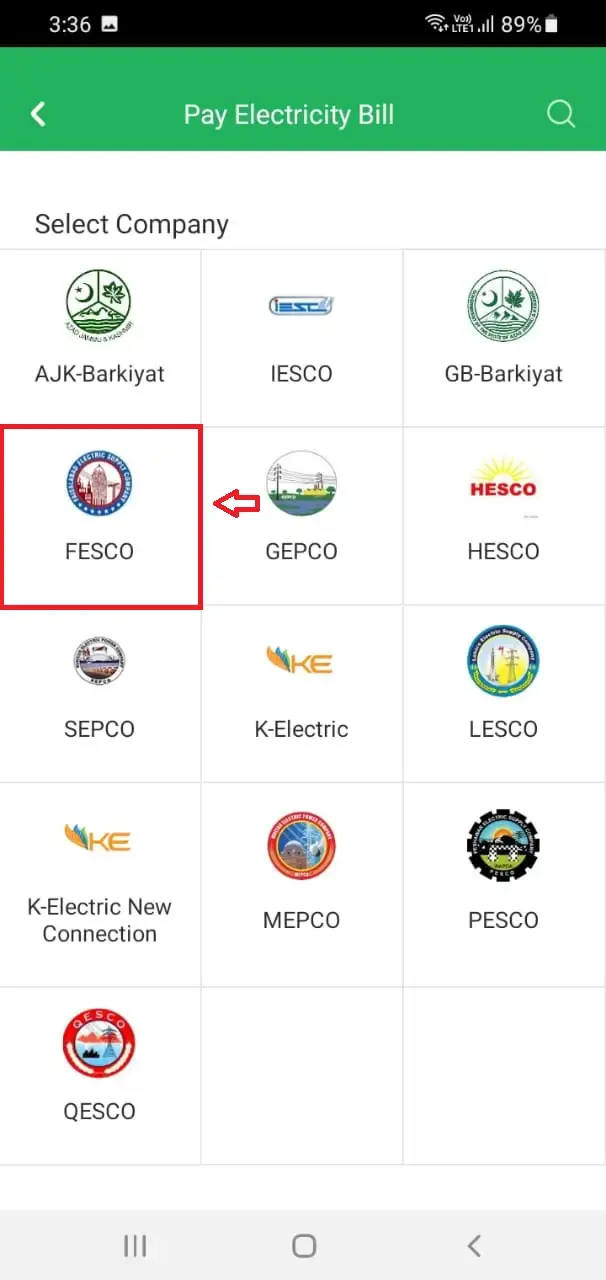
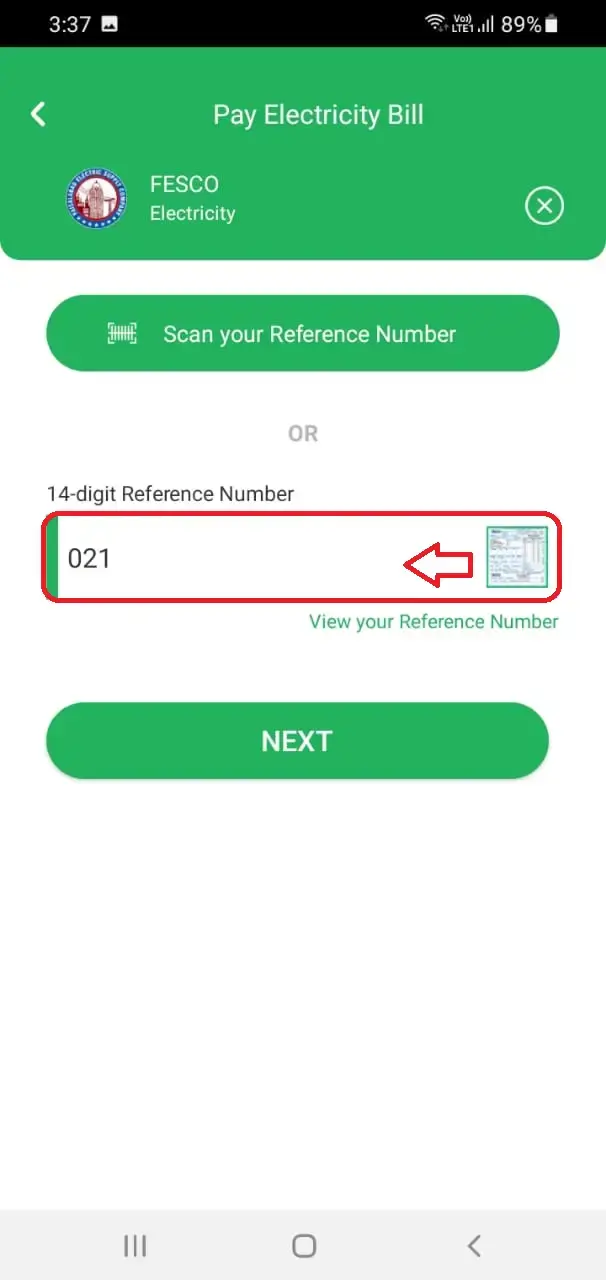
If you have a Jazz Cash App account then good, if not then firstly, download Jazz Cash App from Google Playstore and register your account then recharge the amount in it. Step by step with pictures are guided below:
Easypaisa:
If you have a Easypaisa account then good if not first of all download the app from Google Playstore and install it and recharge it. Then follow the steps that are mentioned below:
Offline Payment Methods:
If you don’t have any App or bank account then you must use this option to pay your FESCO Online Bill. Pay your bill at:
- All Commercial Banks
- Microfinance Banks
- Post Officer nearest your location.
- Nearby all retail shops.
FESCO Coverage Areas
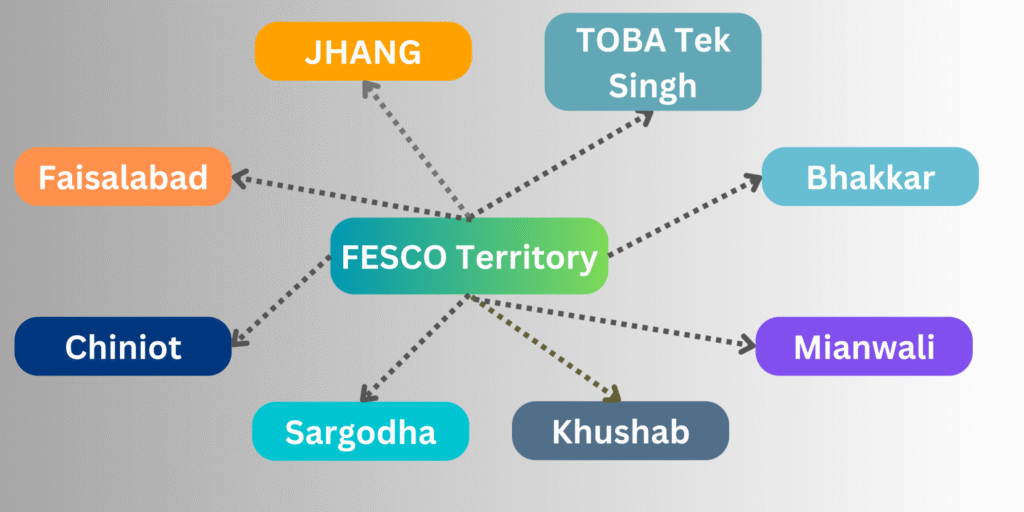
FESCO provides electricity to the following districts in Punjab:
FESCO Jurisdiction Table:
District | Major Cities | Subdivision Count |
Faisalabad | Faisalabad City, Jaranwala | 8 |
Sargodha | Sargodha, Bhalwal | 6 |
Mianwali | Mianwali, Piplan | 3 |
Toba Tek Singh | Toba, Gojra | 4 |
Bhakkar | Bhakkar, Darya Khan | 3 |
Jhang | Jhang, Shorkot | 5 |
Chiniot | Chiniot, Lalian | 2 |
Khushab | Khushab, Noorpur Thal | 2 |
Consumer Base: Over 4.5 million active connections.
FESCO Online Services
FESCO continues to digitize its operations with multiple online services:
Key Online Services:
- FESCO Online Bill Checking
- Duplicate Bill Download
- Bill Correction Request
- New Connection Application (ENC Portal)
- Demand Notice Tracking
- Mobile App for FESCO Consumers
- FESCO Complaint Portal
FESCO Online Bill Checking
Duplicate Bill Download
Bill Correction Request
New Connection Application (ENC Portal)
Demand Notice Tracking
Mobile App for FESCO Consumers
FESCO Complaint Portal
FESCO Mobile App Features
FESCO offers an Android and iOS app that enhances accessibility.
App Highlights:
You can download the app from Google Play Store or Apple App Store by searching “FESCO”.
View current and old FESCO bills
Download duplicate FESCO bills
Apply for a new connection
Track demand notice
Lodge complaints
Get to know more about FESCO
FESCO Bill Breakdown and Charges
Understanding your bill can help manage electricity usage.
Typical Bill Charges:
- Units Consumed (kWh)
- Fixed Charges
- Fuel Price Adjustment (FPA)
- GST, ED, TV Fee
- Late Payment Surcharge
🧮 FESCO Unit Rates (2025 Estimate)
Units Consumed | Rate/Unit (PKR) |
0 – 100 | 7.74 |
101 – 200 | 10.06 |
201 – 300 | 12.15 |
301 – 700 | 19.55 |
700+ | 22.65 |
Note: Rates are subject to NEPRA updates.
Common FESCO Consumer Issues & Support
FESCO offers consumer support through multiple channels:
Common Issues:
- Incorrect meter readings
- Delayed bills or SMS
- Complaint about overbilling
- Load shedding schedule
FESCO Complaint Cell:
- Helpline: 111-000-118
- SMS Service: 8118
- Online Portal: FESCO Complaint Registration
How to Apply for FESCO New Connection
New electricity connection can be applied online via the ENC system:
Steps to Apply:
- Go to: enc.com.pk
- Register an account.
- Fill the New Connection Form.
- Upload required documents.
- Submit application and download the Demand Notice.
- Pay the notice and wait for meter installation.
You can track application using Tracking ID provided after submission.
FESCO Bill Correction
FESCO consumers are always allowed to rectify their bills if they got an extra charged bill or wrong meter number bill.
- If you had paid all your bills but your current bill showing arrears then go to the revenue officer of FESCO and give an application to correct it and also provide them with all your previous paid bills.
- If you got a wrong meter reading bill, go to the head office and rectify your bill immediately.
- If you receive notification of your bill that your bills are not paid and a FESCO employee came to disconnect your connection then immediately show them your previous paid bills and also current month’s paid receipt.
- Any kind of misconduct done by mistake then timely go to the FESCO and correct all wrong information in your bill.
FAQs About FESCO Online Bill & Services
❓ How can I check FESCO bill without reference number?
You can’t check the bill without a reference number; however, you can find it on any previous paper bill or SMS.
❓ Can I pay FESCO bill after the due date?
Yes, but a late payment surcharge will apply.
❓ Is there a way to get SMS notifications?
Yes. Send your Reference Number to 8118 to register for SMS alerts.
❓ How do I check if my FESCO bill is paid or not?
Use your banking app or call the FESCO helpline to confirm payment status.
❓ Can I change the name on my FESCO meter?
Yes, through the Name Change Form available at FESCO offices or online.
Summary
The FESCO Online Bill System has made bill checking, payments, and customer support more transparent and accessible. Whether you’re a residential user in Faisalabad or a business in Sargodha, FESCO’s digital services allow you to manage your electricity usage efficiently.
From FESCO duplicate bill download to FESCO bill online check Faisalabad, this guide has you covered.
Stay informed, go digital, and save time every month!